
Steps and screens below were checked on Nov 12, 2026. This feature is new, so your screens may look a little different from mine.
Your business can have its own profile inside ChatGPT now. I claimed mine for Jam AI on camera, and it took one sitting, three verification steps, one identity crisis over a dropdown menu, and two tries at a face scan.
Below is every step, with screenshots from my own setup, so you can copy me and skip the confusing parts.
What is a ChatGPT business profile?
A ChatGPT business profile is a listing for your business that lives inside ChatGPT. You manage it in a new area called Business Hub. It holds your business name, website, category, and contact details, and it gives you a dashboard that shows how often ChatGPT mentions you and how many people click through to your site.
Why it matters: people are already asking ChatGPT who to hire and what to buy. A claimed profile is how you tell ChatGPT, in your own words, who you are and what you sell.
Quick definitions
- Business Hub: the part of ChatGPT where you create and manage your business profile. You will find it in the ChatGPT sidebar or at chatgpt.com/business-hub.
- Domain: your website address, like jamout.ai.
- DNS settings: the control panel for your domain. It lives wherever you bought your domain (GoDaddy, Squarespace, Cloudflare and so on).
- TXT record: a short line of text you paste into your DNS settings to prove the website is yours. It does not change how your site looks or works.
- Draft: your profile is saved but not public yet.
What you need before you start
- A ChatGPT account (use the one you want to manage the business from)
- The login for wherever your domain lives
- Your phone, for a verification code
- Your driver's license or another government photo ID
- A spot with good light for a quick face scan
Step 1: Open Business Hub and search for your business
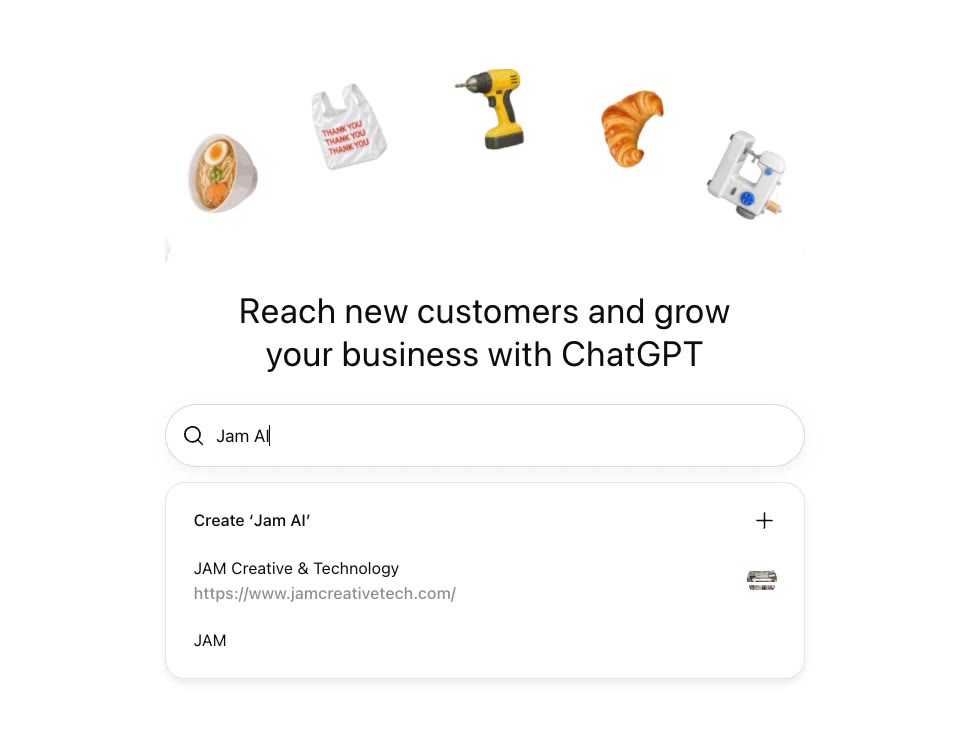
Sign in to ChatGPT, then open Business Hub from the sidebar or go to chatgpt.com/business-hub. Type your business name into the search box.
If your business already shows up in the list, pick it. If it does not, click Create next to your name. Mine was not there yet, so I created "Jam AI".
Step 2: Tell ChatGPT how customers find you
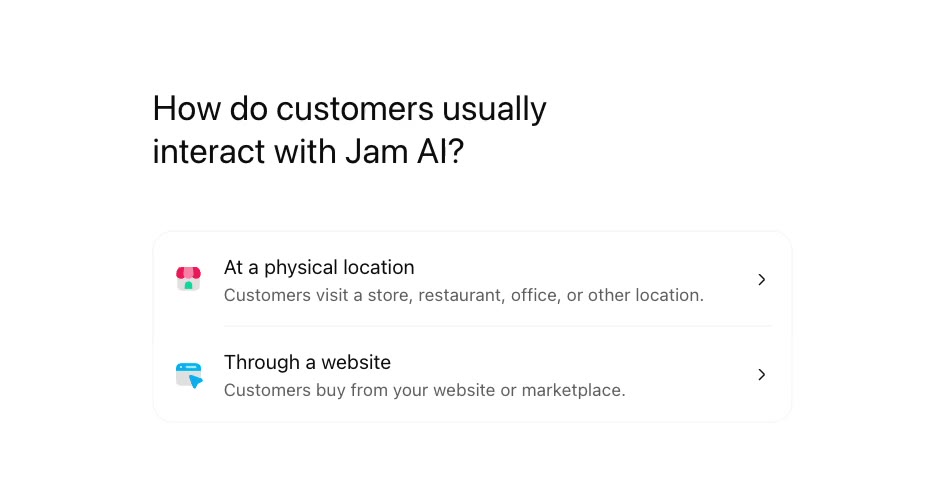
Next it asks how customers usually interact with your business. There are two choices:
- At a physical location: customers visit a store, restaurant, office or other location.
- Through a website: customers buy from your website or a marketplace.
I picked "Through a website" because Jam AI is online. Then you enter your website address.
Step 3: Prove you own your website
This is the step that scares people, and it is easier than it looks. ChatGPT shows you a TXT record with three parts: a type, a name (or host), and a value. Each one has a copy button.
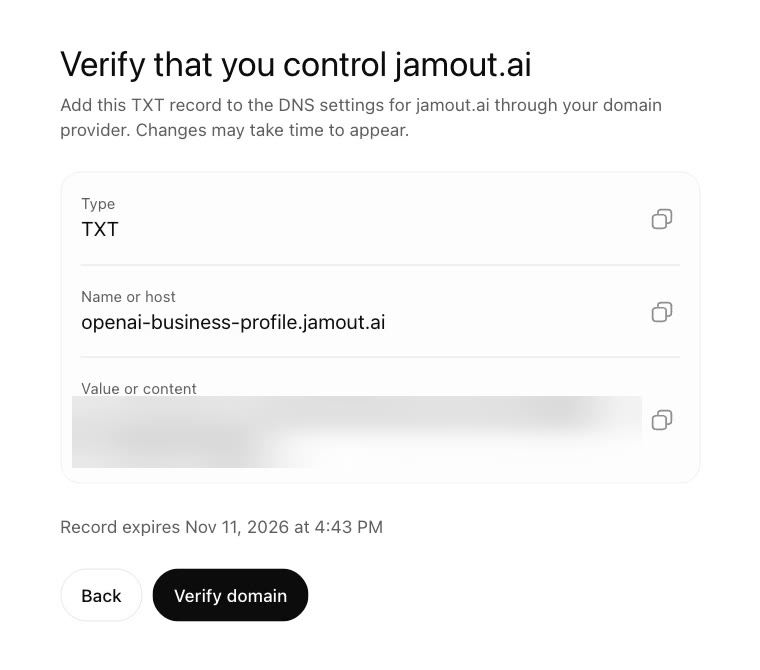
Here is what to do:
- Log in to wherever you bought your domain and open the DNS settings.
- Add a new record and choose TXT as the type.
- Copy the name and the value from ChatGPT and paste them in exactly as shown.
- Save, go back to ChatGPT, and click Verify domain.
Two things to know. The record has an expiration time on it, so do this in the same sitting. And DNS changes can take a few minutes to show up, so if Verify fails the first time, wait a bit and click it again.
I had Claude do the nerdy part for me. If you want help, paste this into Claude:
I need to add a TXT record to my domain to verify my website with ChatGPT. My domain is managed at [where you bought your domain]. Here is the record: [paste the type, name and value]. Walk me through it one click at a time, and do not change any of my other records.
Step 4: Pick your business category
Now you get a screen that says "Help people get to know" your business. Click the category dropdown and start typing. It searches as you type.
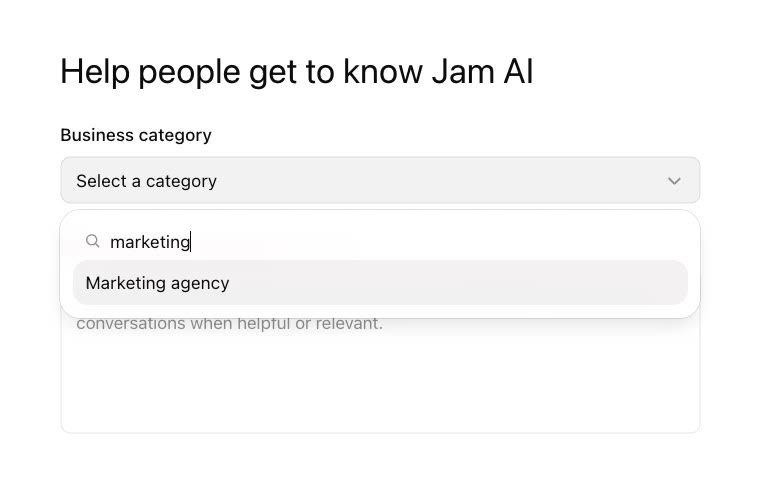
I had a small identity crisis here. Am I a marketing agency? An educational consultant? I tried a few and landed on "Business consultant". My advice: pick the closest fit and keep moving. You can edit your business info later, once you are verified.
Step 5: Verify your phone number
Enter your business phone number, then choose how you want to get your code: a text message or an automated phone call. Type the code in when it arrives.
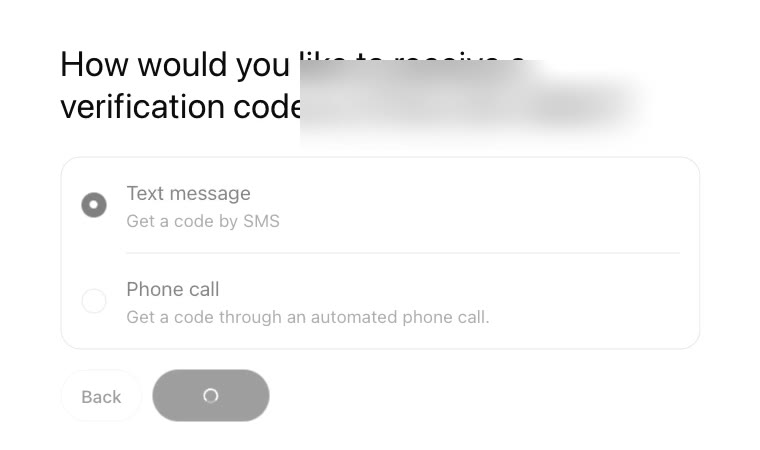
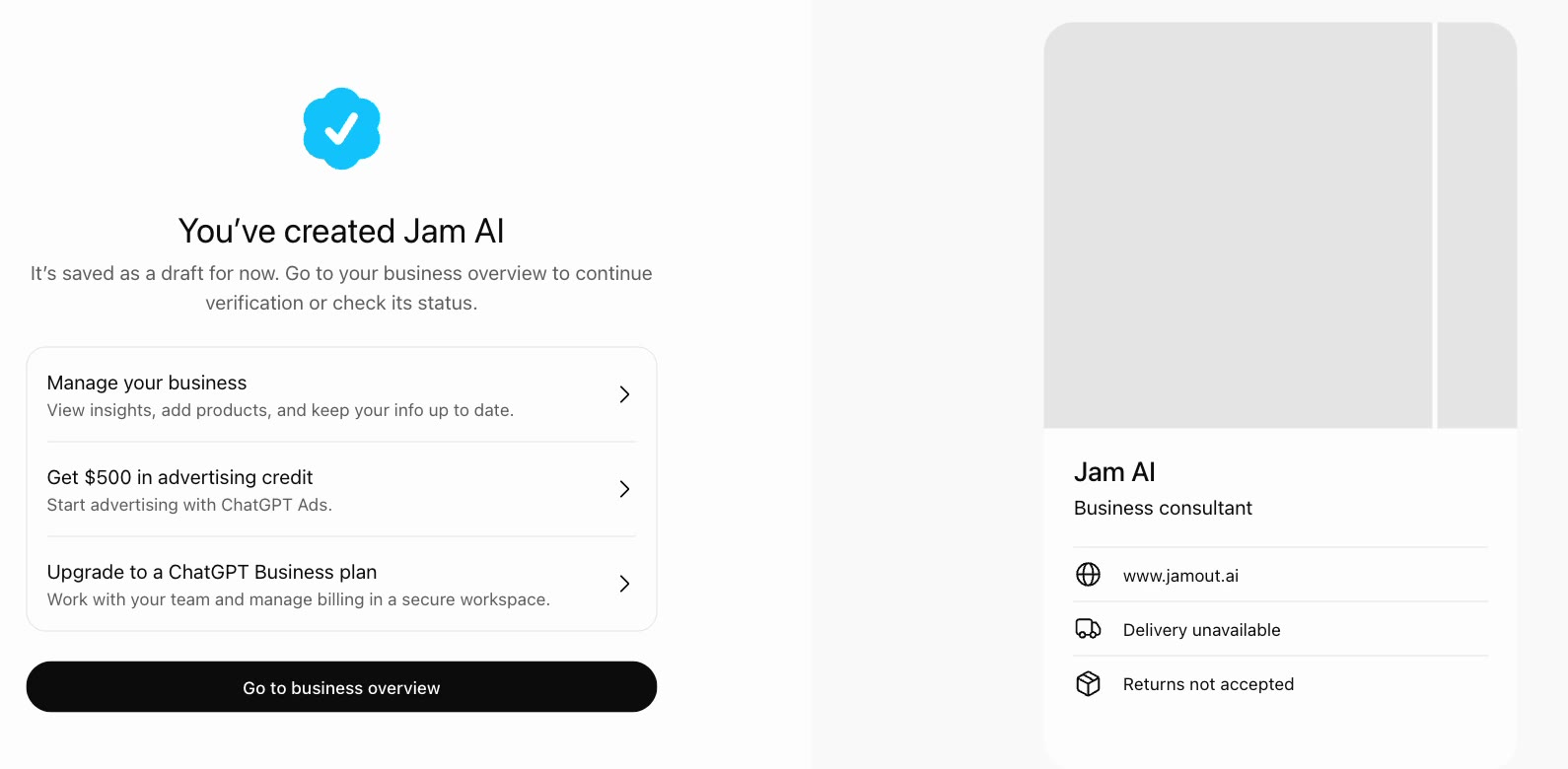
After that you will see a "You've created" screen. Your profile is now saved as a draft. Click Go to business overview.
Step 6: Verify your identity
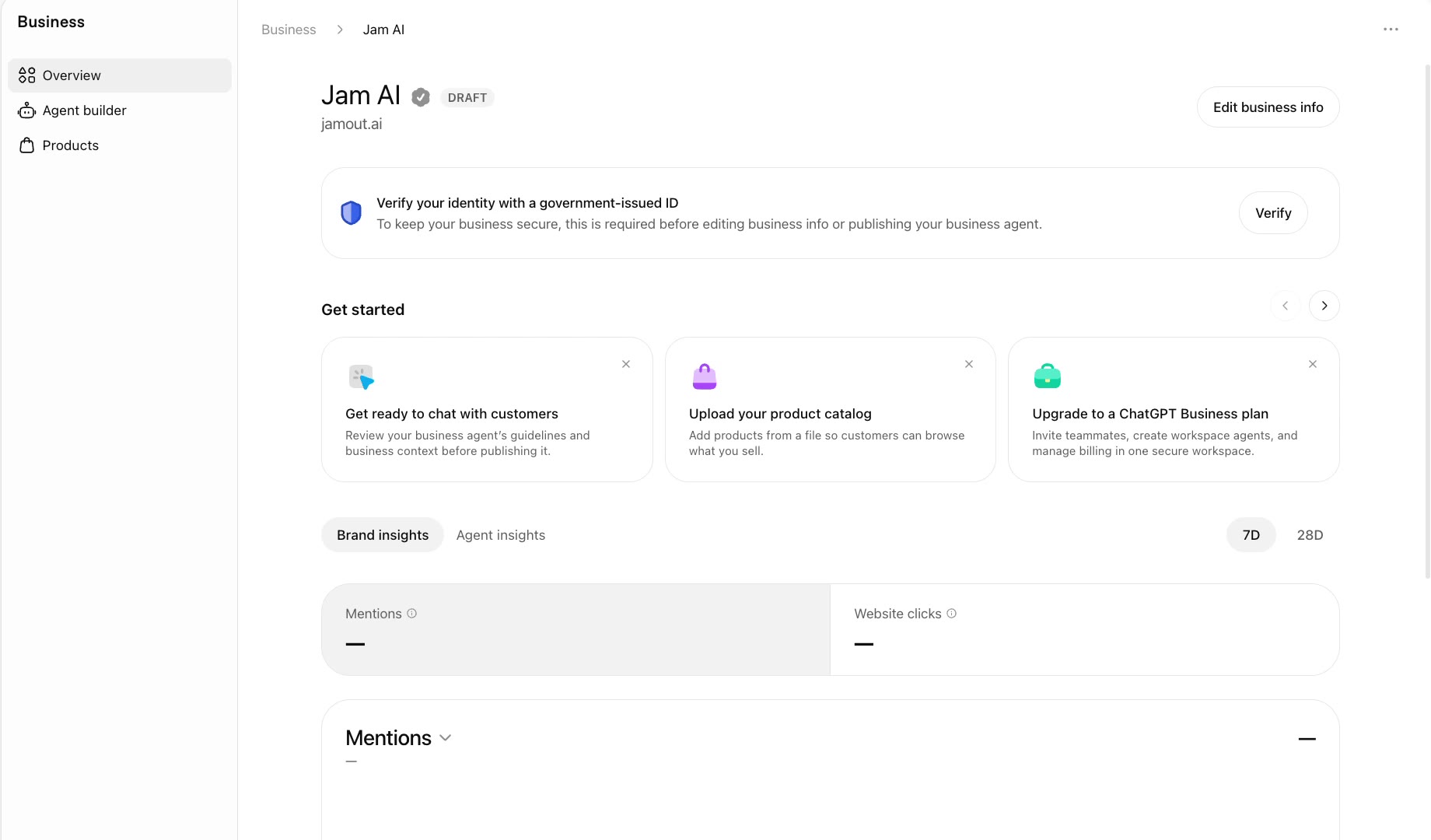
Your business overview has a banner at the top that says "Verify your identity with a government-issued ID". ChatGPT requires this before you can edit your business info or publish a business agent. Click Verify.
It walks you through three quick things.
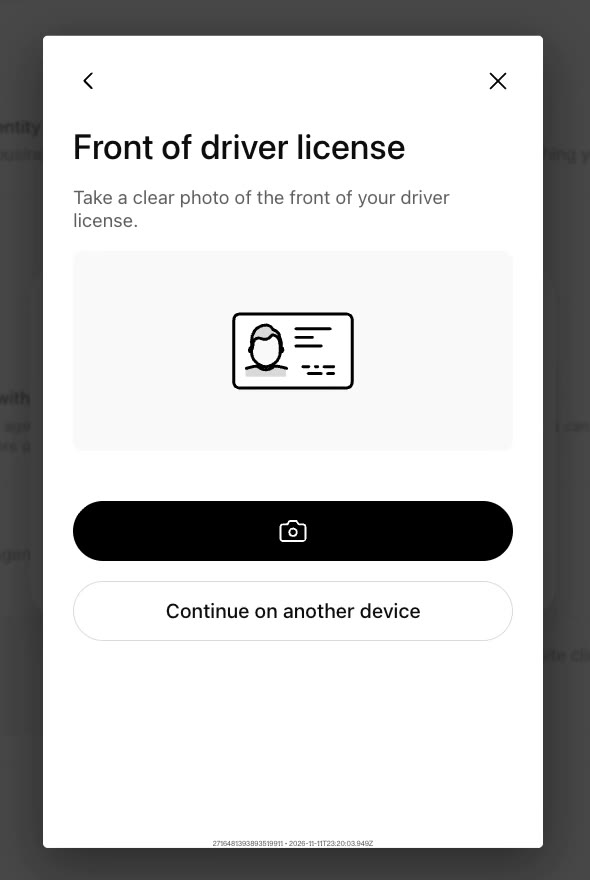
A photo of your ID
Hold your driver's license up to your camera, or choose "Continue on another device" to finish on your phone, which is easier.
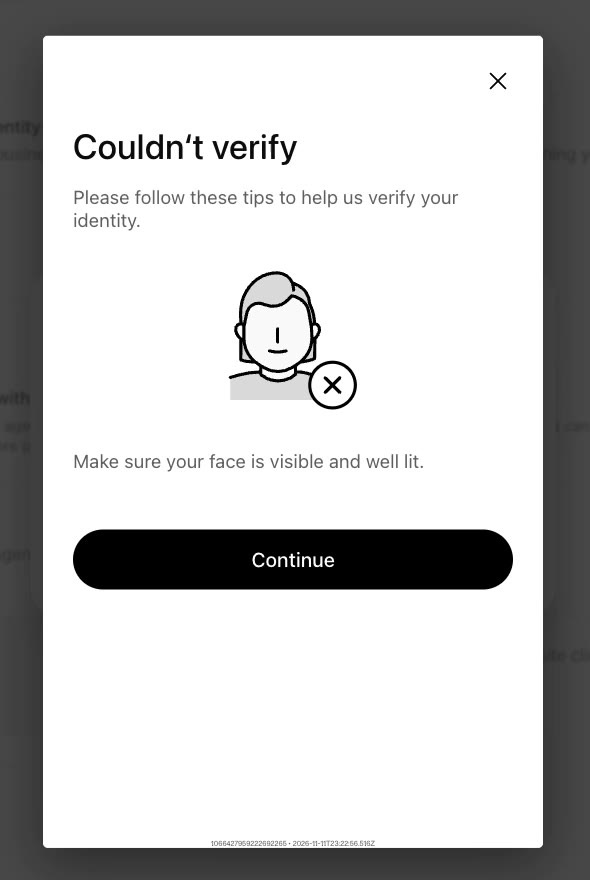
A face scan
Mine failed the first time. The screen said "Couldn't verify" and told me to make sure my face was visible and well lit. I moved toward the light, tried again, and it worked. So if yours fails, do not panic. Fix your lighting and go again.
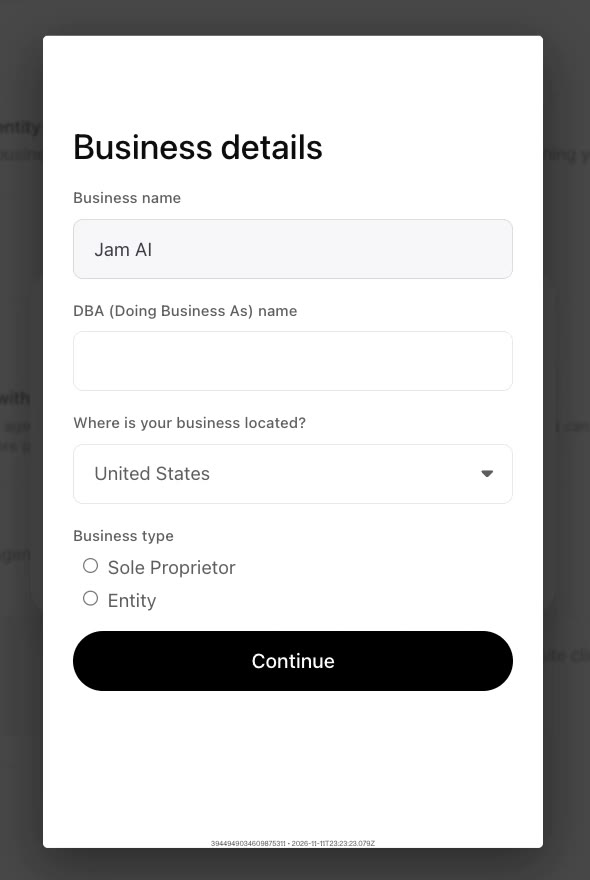
Your business details
Last, it asks for your business name, a DBA name if you have one, where your business is located, and your business type: sole proprietor or entity. I chose sole proprietor. Have your business paperwork nearby in case it asks you for more.
Step 7: Submit and wait for review
When you finish, you will see "Application in review". ChatGPT says status updates will show up in your organization settings over the next few days. Click Done.
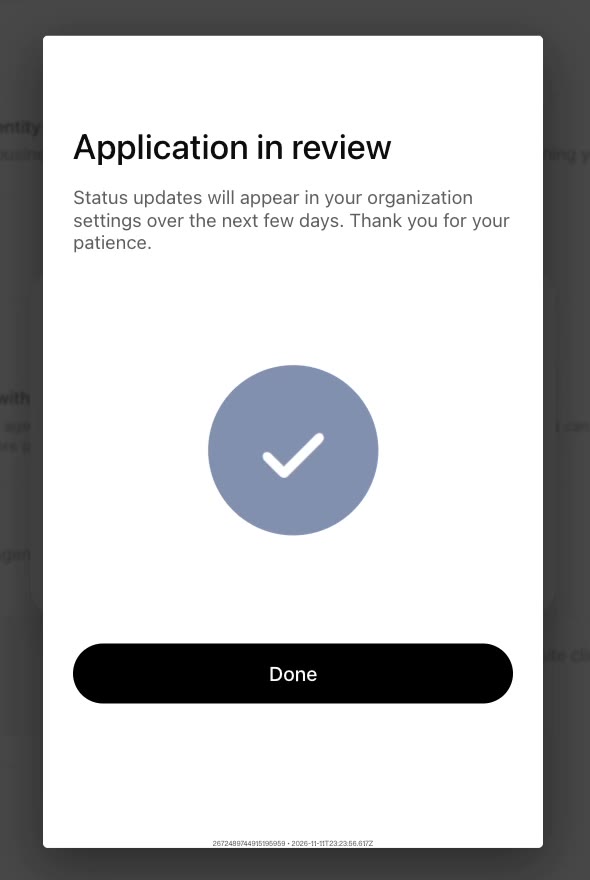
That is where mine is right now. I will update this post when my review comes back.
What you get after you claim it
Even as a draft, my overview already shows what is coming:
- Brand insights: how many times ChatGPT mentioned your business and how many website clicks you got, for the last 7 or 28 days.
- Agent builder: a place to set up a business agent that can chat with customers about what you offer.
- Products: a place to upload your product catalog so people can browse what you sell.
The confirmation screen also offered me $500 in advertising credit for ChatGPT Ads. I have not used it, so I can't tell you yet if it is worth it.
Do you have a Shopify store?
You may get a shortcut. Search Engine World's setup guide lists four ways to verify a business: your website domain (what I did), a business phone, a business email, or connecting your Shopify store. Which ones you see depends on your listing.
The same guide says that during the beta, local stores and restaurants can only claim listings that already exist in the U.S. So if you run a physical shop and can't find yourself in the search, that may be why.
My honest take
I can't promise this will send you customers. It is brand new, and nobody has real numbers yet. What I can tell you is that it costs nothing but a little time, and you want your name claimed by you and not sitting there empty.
Block out half an hour, grab your license, and go claim yours. If the TXT record step makes you nervous, open Claude and let it walk you through it. That is exactly the kind of thing we practice together in Club Jam on Skool ($47/mo, cancel anytime) 🧡
Frequently asked questions
What is a ChatGPT business profile?
A ChatGPT business profile is a listing for your business inside ChatGPT. You create and manage it in Business Hub. It holds your business name, website, category and contact details, and it comes with a dashboard that shows mentions and website clicks.
How do I claim my ChatGPT business profile?
Sign in to ChatGPT, open Business Hub, and search for your business name. Pick your listing or create a new one, verify that you own your website, choose a category, verify your phone number, then verify your identity with a government-issued ID. After that your application goes into review.
How do I verify my website for ChatGPT?
ChatGPT gives you a TXT record with a type, a name and a value. Log in to wherever your domain is managed, open the DNS settings, add a new TXT record with those exact details, save it, then go back to ChatGPT and click Verify domain. If it fails, wait a few minutes and try again.
Do I need a Shopify store to get a ChatGPT business profile?
No. I verified with my website domain and do not use Shopify. Connecting a Shopify store is one of several verification options, along with a website domain, a business phone or a business email.
Why does ChatGPT ask for my driver's license?
ChatGPT requires identity verification with a government-issued ID before you can edit your business info or publish a business agent. It is how they confirm that the person claiming a business has the authority to manage it. The check includes a photo of your ID and a face scan.
How long does ChatGPT business profile approval take?
There is no set time. After I submitted, ChatGPT said status updates would appear over the next few days. My application was still in review when I wrote this.
What if the face scan fails?
Try again in better light. Mine failed on the first try with a message to make sure my face was visible and well lit, and it passed on the second try.
 Club Jam